 AI Toy Bridge
When the device cannot connect
If your device is not supported after attempting to connect, and you still cannot find a matching protocol after clicking "No response," you can mention the developer in the group or send a private message for compatibility support. To make compatibility work easier, I need the following information:
-
Device brand and model
-
The official app or mini program used to control the device
-
Which features are available, how many levels each feature has, and whether they can be enabled at the same time
-
The approximate time when you tried using my app
-
Your user token: do not post it in the group. Please message the developer privately, or @小鱼 in the group to get a private submission link
Only with this information can I provide more convenient and accurate compatibility support. Since I cannot verify the compatibility code on a real device myself, compatibility may fail. In that case, I need your cooperation to help us improve it together.
Example feedback for connection failure
Hi, my device is XX brand XX model, and the official app is XX App / XX mini program (a download link would be best).
The device functions are roughly:
-
Vibration: 9 levels, or it can be changed to stepless intensity adjustment; choose one
-
Suction: 8 levels
-
Heating: on / off
-
Vibration and suction can be turned on at the same time
I tried connecting at around 8:40 PM tonight. After connecting, it showed as unsupported. I also tapped “No response,” but I still could not find a working control method. I will send the user token to you privately.
Here is a screenshot:
[Screenshot of the device scanning page]
[Screenshot after clicking "No response"]
[Screenshot of the official app control page]
If you need me to continue testing, I can help.
Where to copy the user identifier
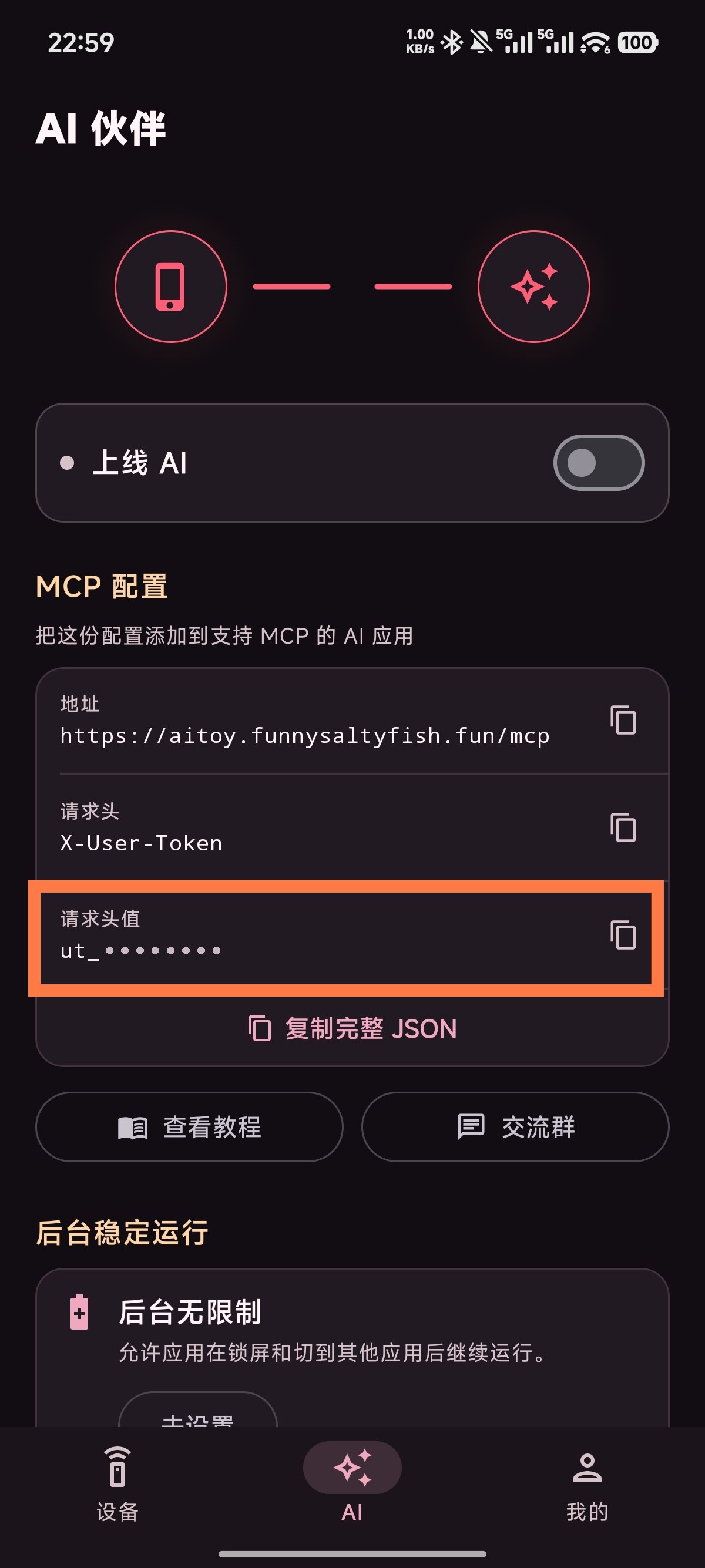
Open the AI page at the bottom of the app. In MCP configuration, tap the Header value row to copy your user token (in the form ut_xxx). Anyone who obtains the token can control your device, so please mask it in screenshots posted to the group.
When it can connect but control is abnormal
If your device can already connect but you have problems when using it, you can also report that. For example: it connects but does not respond, a certain part is controlled incorrectly, the number of levels is wrong, only some functions can be controlled, the connection is unstable, the device list is abnormal, etc.
When reporting, please try to explain:
-
Device brand and model
-
The approximate time when you tried AI Toy Bridge
-
Whether it can currently connect successfully
-
Which features work and which do not
-
Whether the features shown in the app match the device’s actual response
-
If there are multiple devices, multiple modes, or multiple accessories, please describe each separately
-
Your user token: do not post it in the group. Please message the developer privately, or @小鱼 in the group to get a private submission link
Example feedback for abnormal control
Teacher, sorry to bother you. I would like to report issues after the adaptation.
My device is XX brand, XX model. I tested it at around 8:57 PM tonight. I will send the user token to you privately.
The device can connect now, but there are control issues:
-
The App shows that "part 1" is suction, but it actually controls vibration
-
The App shows that "part 2" is vibration, but it actually controls suction
-
The device actually has 8 suction levels, but the App shows only 5 levels
-
The device actually has 9 vibration levels, but the App shows 10 levels
Also, my device has two modes. It works when connected separately, but there are problems when both are connected at the same time. I've put the details in the screenshots:
[Screenshot of the device scanning page]
[Screenshot of the control page after Mode 1 is connected]
[Screenshot of the control page after Mode 2 is connected]
Pre-submission checklist
You don't have to follow the template above exactly, but the key is to provide this necessary information.
Otherwise, if you only give a few words, it will be very hard for me to handle it directly. I would have to search for your device again, look up the manual, and then check each specific function one by one, and might even have to find where to download the software, which would be quite troublesome.
So if you can provide it, it's best to include it as well. It also improves efficiency.